SteelFlow
Steel Fabrication Shop Floor Software
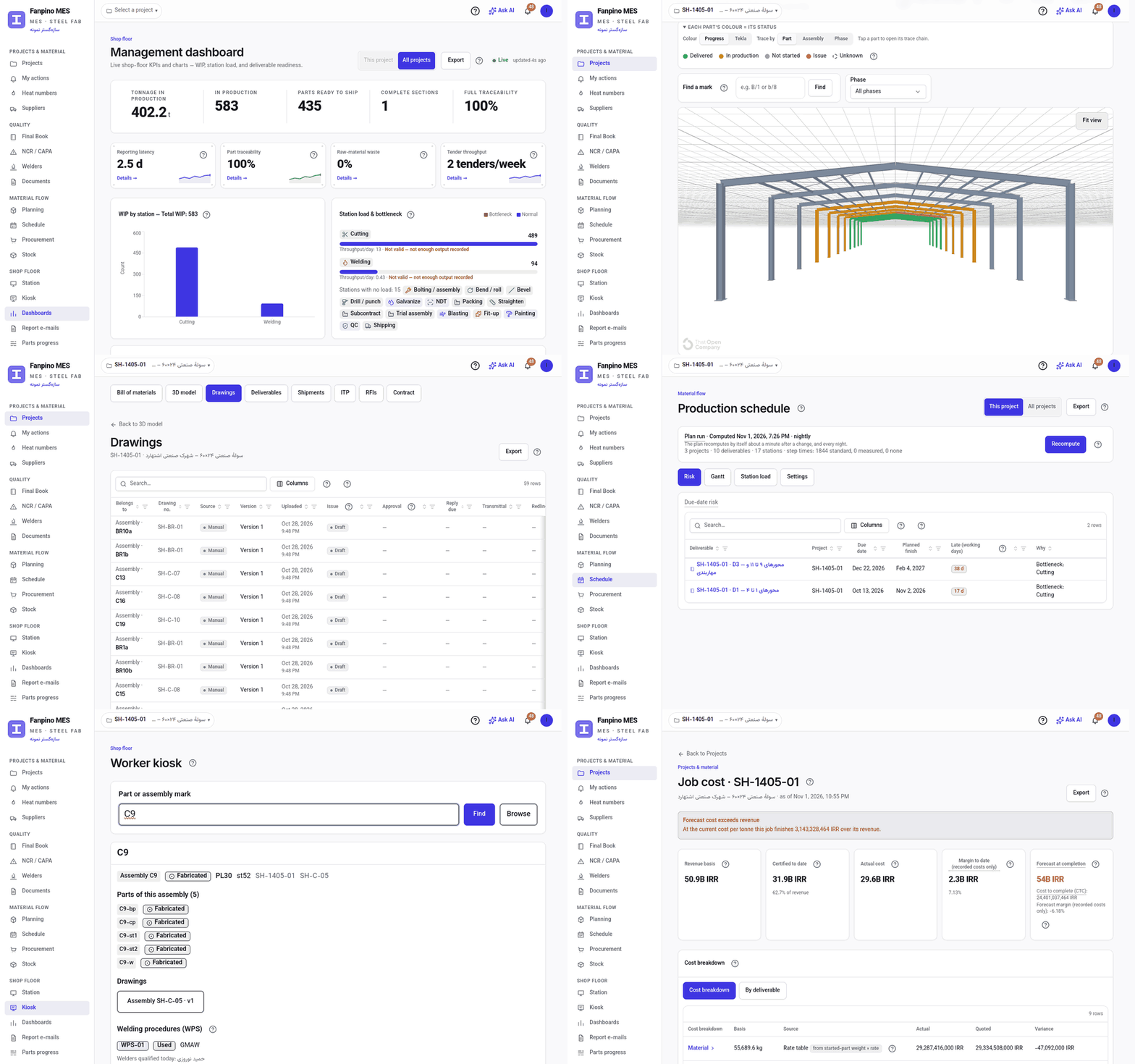
SteelFlow is a manufacturing execution system for steel-fabrication shops. It traces every part, weld and heat from the Tekla model to erection on site, and the shop floor keeps working offline.
For steel-structure fabricators (sheds, industrial halls and buildings) with 20 to 500 people. Planners, shop-floor operators, QC inspectors, procurement and managers each work in the system in their own role. The client's representative and the third-party inspector can also get their own read-only access.
Why SteelFlow
- Full traceability: From a part to its heat, mill and certificate (MTC), and on to its WPS, welder, NDT and coating. This is what the client's inspector asks for.
- Final Book in one click: A signed MRB/Final Book PDF for one deliverable, or for the whole project in Persian, English or Arabic, with a drawing register and the stamped drawings merged in. It is built from records that already exist, so nobody assembles it by hand.
- Two-way with Tekla: The Tekla desktop app (Tekla 2016 to 2026) sends the BOM on every save, colours the model by production status and locks built parts in Tekla.
- AI assistant (optional): It drafts phasing, truck loads, the weekly release, purchase orders for shortages and ITP drafts as proposals you preview. Nothing is saved until you accept it. It is off by default.
- Works offline: The station tablet keeps scanning without network and syncs later.
- Live 3D model: Every member of the Tekla/IFC model is coloured by its real production status.
- Quote to claim: Tenders, contracts, variation orders, progress claims, job costing and export to the accounting package.
- Trilingual: The UI is in Persian, English and Arabic, with full RTL. The Final Book is issued in the client's language.
Every capability, area by area
Engineering
- Tekla plugin and CSV/Excel BOM import, with BOM versions. Each new revision opens a change-impact review, which also shows renumbered marks, before it is confirmed.
- Tekla desktop app in three languages: auto-send on save, production-status colours on the model, locking built parts, Show in Tekla, RFIs and transmittals from the selection, and an AI model review with a clash check.
- 3D model viewer (IFC), coloured by live status. Click a member to open its part. A shape view for a single part, with 2D, 3D and the section.
- Drawing register with versions. Clients can mark up drawings in the browser.
- Transmittals (IFA, IFC, for information) with A/B/C approval by the client.
- RFI / technical query log, tied to a part, assembly or drawing. Clients can answer it themselves.
Commercial
- Cost-rate table and tenders, with quote versions and win/loss tracking.
- Contracts with milestones, retention, variation orders, and progress claims certified by tonnage or by %.
- Job costing: actual material, labour and direct cost against the quote and the contract, with cost to complete (CTC), forecast at completion (FAC), margin and a tonnage S-curve.
- Accounting hand-off: certified claims, supplier invoices and POs go out as one CSV/Excel voucher file per period.
Supply & stock
- Supplier register. Purchase demand is generated from the BOM. Purchase orders, goods receipt and invoices are matched three ways.
- Material lots with heat numbers and MTC PDFs. A heat can be quarantined, which raises a containment NCR on every affected part.
- Stock is reserved when work is released and consumed at the cut scan.
- 1-D nesting on stock lengths, with tracked remnants.
Planning
- Build proposals: what can be built now, and which material is missing. Work is released by assembly kit, and a shortage becomes a purchase request.
- Planning assistant (optional): proposed phasing, truck loads and weekly release, previewed before anything is saved.
- Finite-capacity schedule: station capacity and a shift/holiday calendar, a Gantt per deliverable, station load, and due-date risk.
Shop floor
- Station screen for tablets: scan a barcode label, then Start and Finish work. Real labour time is recorded per operation. Works offline.
- Kiosk: type or scan a mark to see the part's drawings, WPS, welder and the procedures to read. Search ignores letter case.
- Workflow designer with 12 ready templates and a standard time per step.
- A4 barcode label sheets for parts.
Quality
- QC gates, NDT/UT and DFT. Weld logs check WPS and welder qualification, with expiry alerts for welder certificates.
- NCR, then CAPA, then MRB disposition (scrap, repair or rework). The disposition moves the part's status.
- ITP with hold and witness points, signed by the client and the third-party inspector.
- Controlled documents (procedures, work instructions) with read receipts.
Delivery
- Shipments with a packing list, plus delivered and erected status. An open NCR, QC, NDT, DFT, MTC or ITP item blocks dispatch unless a manager records a concession.
- Final Book (MRB): a signed (prepared, checked, approved) PDF per deliverable, or for the whole project in Persian, English or Arabic, with a drawing register and the stamped drawings. The client gets a 30-day share link with no account needed.
Management
- Live dashboard: WIP tonnage, station load, readiness per deliverable, cycle time, labour hours, and who is working on what right now.
- Excel/PDF export of every list. Daily or weekly PDF reports by e-mail.
- Notifications: in-app, e-mail, SMS, and a Telegram/Bale-compatible bot. Outbound webhooks.
- Full activity log: who changed what, when, and from what to what.
- Roles: planner, operator, inspector, manager, procurement and admin. External roles: client and third-party inspector, each seeing only their own projects.
- Client and third-party inspector portal: part summary, Final Books, MTCs, ITP evidence and an awaiting-me list.
- Column filters on the tables, and each language's own calendar (Jalali in Persian).
- Built-in Help Center and glossary, in the same three languages. Where work is blocked, Ask the assistant explains why and what to do (when the assistant is on).
Technical facts
- Web app plus an installable PWA on tablets and phones. Nothing to install on the server side for users.
- Multi-tenant SaaS: each company's data is isolated by database row-level security. An on-premises install is possible.
- Tekla Structures plugin and desktop app (.NET, Tekla 2016 to 2026, auto-updating) and IFC import.
- Optional AI assistant, off by default, with a monthly usage cap and settings per role.
Screenshots are from a demo workspace with made-up data.
Features
Two-way with Tekla
The BOM goes out on every Tekla save, and production status and locks on built parts come back into the model.
Offline Shop Floor
PowerSync-backed stations keep logging progress through network drops, sync on reconnect.
Weld-to-Part Traceability
Heat numbers, welder qualifications, and NDT results linked to every part.
QC: WPS-WPQ, NDT, Coating
Procedure/qualification checks, inspection records, and NCR/CAPA nonconformance flow.
Final Book (MRB)
Signed PDF from the audit trail, per deliverable or for the whole project in Persian, English or Arabic.
Planning & Nesting
Production scheduling and material nesting to cut waste.
Procurement & Tender
Material requisition and tender workflows tied to the BOM.
3D Model Viewer
Browser IFC/Fragments viewer, parts coloured by live production status.
KPI Dashboards
Station WIP, throughput, and quality metrics in real time.
RBAC & Full Audit
Operator, planner, inspector, manager, procurement and admin roles, plus client and inspector access. Every write is logged.
AI Assistant (optional)
Phasing, truck loads, weekly release and shortage POs as proposals you preview first. Off by default.
Client & Inspector Portal
Read-only views of parts, Final Books, MTCs and ITP evidence, plus what is waiting on them.
Screenshots
Key advantages
Built for the shop floor, not the office
Offline-first stations survive real factory network conditions.
Tekla-native
BOM comes from the model your engineers already build, not a spreadsheet re-entry.
Audit-grade traceability
Every part traces back to heat number, welder, and inspection record for MRB delivery.
Self-hostable / air-gapped friendly
Runs on dedicated infrastructure; the optional AI assistant is the only cloud dependency and stays off by default.
How it compares
| Capability | SteelFlow | SAP PP | Generic ERP/MES | Spreadsheets |
|---|---|---|---|---|
| Tekla model → BOM | ✓ | ✗ | ✗ | ✗ |
| Offline shop-floor logging | ✓ | ~ | ~ | ✓ |
| Weld/heat-number traceability | ✓ | ~ | ~ | ✗ |
| QC + NCR/CAPA workflow | ✓ | ✓ | ~ | ✗ |
| 3D IFC model viewer | ✓ | ✗ | ✗ | ✗ |
| Self-hostable | ✓ | ✗ | ~ | ✓ |
Comparison reflects publicly known capabilities of general-purpose ERP/MES platforms and manual spreadsheet tracking; SteelFlow focuses specifically on steel-fabrication traceability and Tekla integration.
Pricing
Subscribe on our servers, or licence it for your own.
Prices in USD, paid in cryptocurrency.
Project
Cancel anytime
- ✓Up to 2 concurrent projects
- ✓Tekla → BOM, shop-floor tracking, QC/NDT
- ✓NCR/CAPA + MRB reports
- ✓Offline stations (PowerSync)
Factory
Cancel anytime
- ✓Unlimited projects & users
- ✓Planning, nesting & procurement/tender
- ✓3D IFC model viewer + KPI dashboards
- ✓Priority support
Enterprise
- ✓Multi-factory / air-gapped deployment
- ✓Tekla plugin rollout & onboarding
- ✓Optional AI traceability assistant
- ✓Dedicated SLA
One-time fee for a licence on your own infrastructure.
On-premise licence
$3,560 deposit, then 6 monthly payments of $890
No surcharge for paying over time · Includes 1 year of updates and support; renews at 20%/year
- ✓Installed on your own servers
- ✓Data never leaves your network
- ✓Unlimited users, no per-seat fee
Enterprise licence
- ✓Multi-site deployment and staging
- ✓SLA, on-site training and handover
- ✓Custom development and integrations
Built with
References and standards
Frequently asked questions
What is SteelFlow MES?
SteelFlow is a manufacturing execution system for steel fabrication. It extracts the BOM from Tekla models, tracks production at each shop-floor station, runs welding, NDT and coating QC with NCR/CAPA, and shows parts in a browser 3D model coloured by live status.
How does the Tekla integration work?
A .NET plugin for Tekla pulls the model straight into a structured bill of materials, so nobody re-types part lists into a spreadsheet. Procurement, tender and nesting then work from that BOM.
What happens when the factory network drops?
Stations are offline-first. They are backed by PowerSync and keep logging progress while disconnected, then sync when the connection comes back.
What traceability does SteelFlow record?
Each part links to its heat number, the welder and their WPS-WPQ qualification, and its NDT and inspection results. Every write is audited, and the manufacturing record book (MRB) is generated as a PDF from that audit trail.
How much does SteelFlow cost?
The Project plan is $199/month for up to 2 concurrent projects; the Factory plan is $449/month with unlimited projects and users plus planning, nesting, procurement, the 3D viewer and KPI dashboards. The on-premise licence is a one-time $8,900 with 1 year of updates and support, renewing at 20% a year.
Can SteelFlow run air-gapped?
Yes. It is self-hostable on dedicated infrastructure. The optional AI assistant is the only part that needs a cloud service, and it is off by default.
Try SteelFlow today
Fill in the form to get a personalized demo and pricing for your business.
Last updated: